The Simnity app for Android
Simnity is a travel eSIM app with prepaid international eSIM data plans by country, region or global coverage. Get internet abroad without a physical SIM card: choose an eSIM data plan, install it on Wi-Fi before you fly, and switch it on when you land.
Get it on Google Play Available on Galaxy Store
Free to download. Any payment fee is shown at checkout before you pay; your bank or card provider may add its own charges. Using an iPhone? Browse plans on this website.
Screens from the app

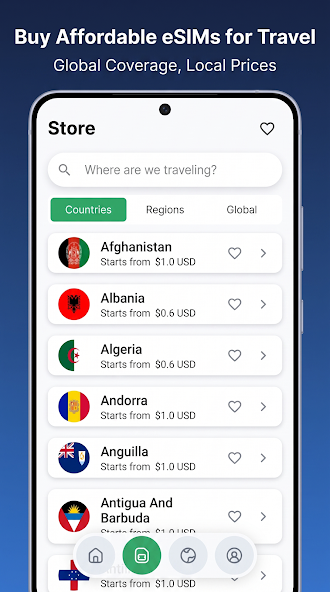

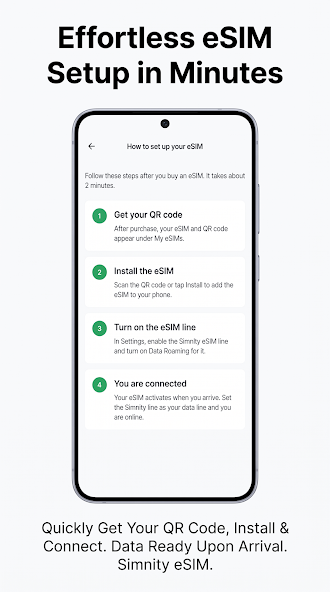

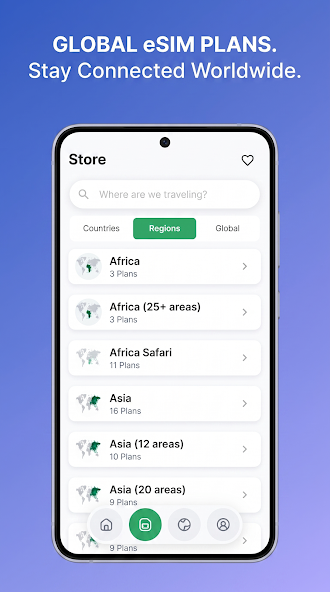
Screenshots from the app's Google Play listing.
What the app does
These features describe the current Google Play version of the app. The app is also listed on Samsung Galaxy Store, where the version can be older.
Prepaid data plans — you see the data amount, validity and price before you pay. No contract.
Coverage shown up front — plans show the countries they cover and, where the provider lists it, the network operator, before you buy.
Keep your usual number — on a dual SIM phone your usual number keeps working for calls and texts while the eSIM handles data.
Data-only by default — plans are data-only unless the plan details say otherwise; internet calling and messaging apps work over the data where local rules allow.
Top up from the app — top up or buy a new plan when your data or validity runs low.
Reminders before expiry — for an active plan with an expiry date, Simnity sends a reminder notification before the plan ends.
eSIM plans for Europe, Japan, the USA and more
Country eSIM plans include the USA, Japan, the United Kingdom, Italy, France, Spain, Turkey, Thailand, Singapore, South Korea, Australia, Mexico, Canada, the UAE and many more. Visiting several countries? Choose a regional eSIM for Europe, Asia, the Middle East and North Africa, Africa, Latin America or Oceania, or a global eSIM plan for multi-country trips. The same plans are on this website: browse all destinations.
Not sure how much data you need? The travel data calculator works it out from the days you travel, the hours of video you watch and your usual daily use.
Inside the app
- Browse eSIM data plans by country, region or global coverage.
- A step-by-step eSIM setup guide, with a QR code or manual details.
- My eSIMs: see your plans, remaining data and days left, as reported by the network provider.
- A reminder notification before an active plan with an expiry date ends.
- Support tickets from inside the app.
- Refer a friend: when a friend completes a qualifying first paid order, you can both get wallet credit. Terms apply; they are on the referral programme page.
How payment works
You pay at checkout with the payment methods shown for your country. The plan price is shown before you pay, and any payment fee is shown at checkout before you pay; your bank or card provider may add its own charges. Your eSIM details are issued after payment is confirmed. Read our refund policy and how we handle payments on the trust and safety page.
Get the app
Tap Get it on Google Play on your Android phone, or open the Simnity page on Samsung Galaxy Store on a Galaxy phone, and install the app from the store. Reading this on a computer? Open this page on your phone, or search for “Simnity” in the store app.
Set up your travel eSIM in five steps
- Check your phone. Check that your phone supports eSIM and is carrier-unlocked.
- Choose a plan. Choose your destination and an international eSIM data plan for the length of your trip.
- Pay and get your eSIM. Pay at checkout and receive your eSIM details.
- Install on Wi-Fi. Install the eSIM on Wi-Fi before you travel.
- Switch on when you land. When you arrive, switch data to the eSIM line and turn on data roaming for that line.
The app's setup guide walks you through installing the eSIM with a QR code or with the manual details. For the exact menus on your phone, see our guides for Samsung Galaxy and Google Pixel, or all setup guides.
Is my phone compatible?
Many recent iPhone, Samsung Galaxy and Google Pixel phones support eSIM, but not every model or market variant does. Your phone must also be carrier-unlocked. Check your exact model with the eSIM compatibility checker before you buy. The app itself runs on Android; iPhone users can buy the same plans on this website.
Simnity is for international travellers, business trips, students abroad, digital nomads and family holidays. Get your travel eSIM before you fly.
Frequently asked questions
Is the Simnity app free to download?
Yes. The app is free on Google Play. Plans are prepaid, with no contract. Any payment fee is shown at checkout before you pay; your bank or card provider may add its own charges.
Which phones can use the app?
The app is for Android. It is on Google Play, and it is also listed on Samsung Galaxy Store, where the version can be older. Your phone must support eSIM and must not be locked to a carrier. Many recent Samsung Galaxy and Google Pixel phones support eSIM, but not every model or market variant does, so check your exact model with our eSIM compatibility checker before you buy. On an iPhone, buy your plan on this website instead.
How do I pay in the app?
You pay at checkout with the payment methods shown for your country. The plan price is shown before you pay, and any payment fee is shown at checkout before you pay; your bank or card provider may add its own charges. Your eSIM details are issued after payment is confirmed.
When does my plan start?
Activation and validity rules can differ by plan. Many plans start when you first connect at your destination; check the selected plan's instructions before you install.
Do I get a phone number?
Most plans are data-only. A plan includes calls, SMS or a number only when its details list them. On a dual SIM phone you can keep your usual number for calls and texts while the eSIM handles data, and internet calling and messaging apps work over the data where local rules allow.
Can I get a refund?
Eligibility depends on Simnity's refund policy and on whether the eSIM was installed or used. Read the refund policy before you pay.
Will the app remind me before my plan runs out?
For an active plan with an expiry date, Simnity sends a reminder notification before the plan ends; plans that are not yet active get no reminder. You can top up or buy a new plan from the app when your data or validity runs low.
More answers are in the help centre FAQ, or contact support.